
BenQ HT2050A Review: Great (Big) Picture for the Money
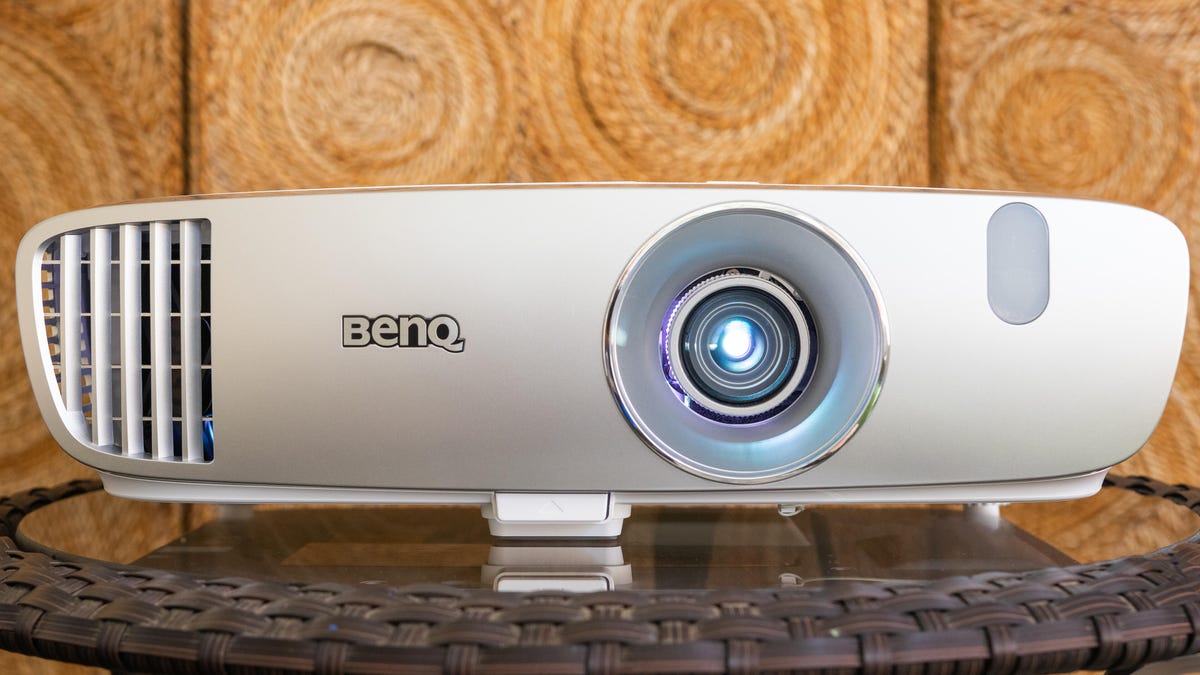
If you’re shopping for a projector between $500 and $1,000, prepare to face a sea of clones. Sizes, designs and even button layouts are often nearly identical from one brand to the next. But there’s something different about the BenQ HT2050A. Although it has a similar price to the competition, it’s larger and there’s a more aesthetically pleasing, curvy design. It looks less like the repurposed business projector and more like something you’d want in your house. And the difference is more than skin deep: This projector’s performance is a step above as well.
Like
Bright picture with great contrast
Accurate, realistic colors
Lens is shift a rarity at this price
Don’t like
Lens shift and zoom don’t adjust far
Rainbows, if they bother you
Better
contrast ratio
and color than its counterparts create some of the best picture quality we’ve seen in this price range. Darker blacks, paired with bright whites, all with accurate color, make for a pleasing image. The cherry on top is a small amount of vertical lens shift, which is rare in this price range and almost nonexistent in single-chip
DLP projectors
. This means more people will be able to fit the projector in their homes. In short the BenQ HT2050A is one of the best projectors you can get for the price.
Editors’ note November, 2022: Despite being several years old, the HT2050A still offers great picture quality for a great price, and remains one of the best deals going for home projectors. It once again earns our Editors’ Choice award.
BenQ HT2050A basic specs
- Native resolution: 1080p
- HDR-compatible: No
- 4K-compatible: No
- 3D-compatible: Yes
- Lumens spec: 2,200
- Zoom: Manual (1.3)
- Lens shift: Manual
- Lamp life (Normal mode): 3,500 hours
Like the other projectors in this price range, the HT2050A lacks 4K and HDR. It is 3D capable, though the glasses aren’t included.
BenQ claims 2,200 ANSI lumens. I measured approximately 1,591. It’s normal for projectors to measure lower than their claimed specs. This is a bright image, similar to the Epson HC2150 and only slightly less than the newer Epson HC2250.
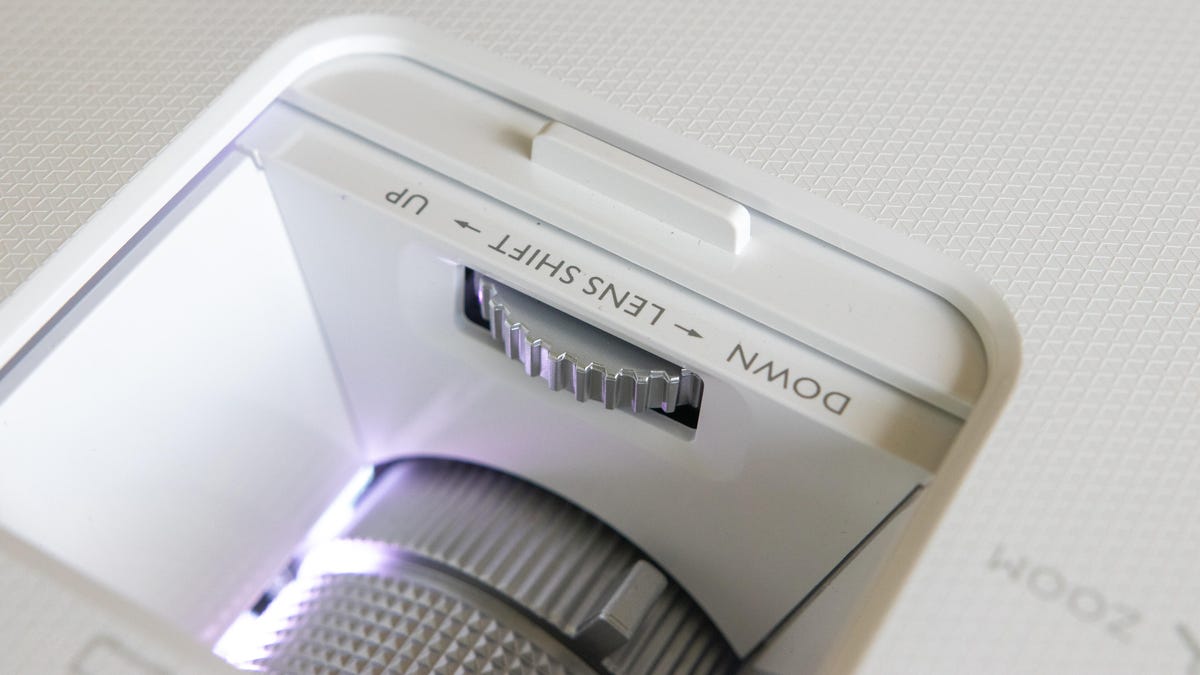
Lens shift in this price range is rare, and rarer still with DLP projectors, so its inclusion here would be one of the HT2050A’s main selling points even if it didn’t look as good as it does. That said, the lens shift isn’t a lot. BenQ says it adjusts the vertical range by 10%. So depending where you place the projector, you’ll have a few inches of vertical leeway, but that’s it. Still, it definitely helps and is better than the nothing you get with most single-chip DLP projectors.
Watch this: Six things to know about home theater projectors
The zoom range is only average however, falling behind the Epson. So you won’t be able to place it quite as close, or as far, from the screen. In that way it’s similar to many other DLP projectors in this price range.
Also average is the lamp life, at 3,500 hours in Normal mode. This goes up to 7,000 hours in the SmartEco mode, which maintains the maximum brightness of the Normal mode but drops lamp power during dark scenes for a better black level. Though you can occasionally see this happen, it’s fast enough that it’s fine to leave in this mode (unless you notice and hate it).
Connectivity and convenience
-
HDMI
inputs: 2 - PC input: Analog RGB
- USB port: 1 (1.5A power)
- Audio input and output: Yes
- Digital audio output: No
- LAN port: No
- 12-volt trigger: Yes
- RS-232 remote port: Yes
- MHL: Yes
- Remote: Backlit
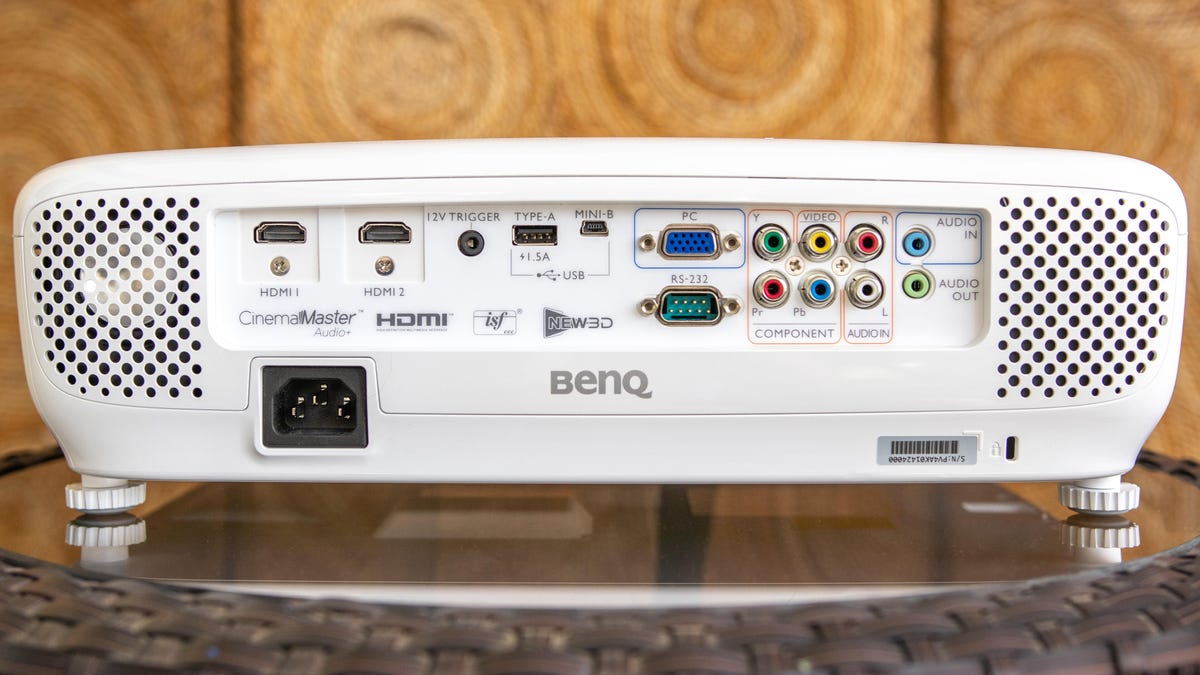
Both HDMI inputs have HDCP 1.4, meaning you can send each input any video source you want. This isn’t the case with some competitors, which only have HDCP 1.4 on one of the HDMI inputs. The USB connection has a claimed 1.5 amp output, letting you power a streaming stick directly with no external power adapters.
The HT2050A has several legacy analog video inputs, which is a rarity these days. Not only do you get component video, but composite as well. So if you want to directly connect something like a Nintendo Wii, or, I don’t know, a LaserDisc player or something, you can do it with no extra adapters. These connections share RCA analog audio inputs.
There are also 3.5mm audio input and outputs, the latter to connect to an external speaker or
soundbar
.
The RS-232 and 12-volt trigger are useful for those with more elaborate home theater systems.
The remote is backlit with a relatively dim orange backlight. This is a good thing: Many of the current crop of projector remotes have a bright blue backlight. Using them can be like forming your own personal B-type star while you’re just trying to change the inputs in the dark.

Picture quality comparisons
I compared the HT2050A to the Epson HC2150 and the Viewsonic PX727HD. The latter, like the BenQ, is DLP. The Epson, like the majority of Epson’s projectors, is LCD. I connected these via a Monoprice 1×4 distribution amplifier and viewed them all on a 102-inch 1.0-gain screen.
Right away the differences were apparent. Firstly, the Viewsonic was far dimmer, and didn’t have the contrast ratio of the other two. This put it at a distant third, so I spent most of my time comparing the Epson and the BenQ.
Both projectors are far brighter than even high-end projectors from a few years ago. What’s more obvious than the numbers would suggest is how much better the black level, and therefore the contrast ratio, is on the BenQ. This is clear when viewing widescreen movies, with the black bars several shades darker on the BenQ. Because their light output is roughly the same, this gives the HT2050A a bit more dimensionality to the image and more apparent depth.
A good example of this is the contrasty scene in Avengers: Infinity War where Thor and his pet rabbit help Tyrion Lannister forge the Stormbreaker battle axe. Nidavellir’s colorful neutron star and magical effects are brightly offset compared to the darkness of space and the shadows of the forge. These shots don’t look bad on the Epson, but the shadows are far more gray than on the BenQ, giving the latter a more pleasing look overall.

Color is another point in the BenQ’s favor. It’s just a little richer and more realistic. Greens especially look more natural. The grass in the Battle of Wakanda, also in Infinity War, for example, is just a more vibrant and realistic shade of green. The blue of the shield wall is a stronger, more vivid blue, without the sky looking like candy.
Another place where the BenQ wins out over the Epson is with motion resolution. All LCD-based displays have some degree of motion blur. DLP-based projectors don’t, thanks to the way they create an image. This is most obvious in the way the BenQ maintains detail when things move. Take the camera-panning action of Live Die Repeat: Edge of Tomorrow. When there are closeups of Emily Blunt or Tom Cruise’s faces, you can still see fine details throughout.
On the other hand there’s DLP’s long-standing problem: rainbows. These are multicolored trails left by bright objects on screen. You may also notice them if you move your eyes quickly. Most people either don’t see them, or aren’t bothered by them, so they may not be an issue for you. But people who are bothered by them are really bothered by them. In that case, no single-chip DLP projector is likely to work. You’ll have to go with an LCD option like the Epson HC2150, or a higher priced LCOS projector (
Sony
or JVC) or a much more expensive three-chip DLP projector.
With its high light output, great-for-its-price contrast ratio and accurate color, the HT2050A is a great choice for someone looking to replace their TV, or who wants a projector for the occasional movie night. The icing on the cake is the lens shift, which should allow the 2050 to fit in a lot more homes than most projectors in this price range.
Geek Box
| Test | Result | Score |
|---|---|---|
| Black luminance (0%) | 0.089 | Average |
| Peak white luminance (100%) | 176.7 | Good |
| Derived lumens | 1591 | Good |
| Avg. grayscale error (10-100%) | 6.608 | Average |
| Dark gray error (20%) | 3.43 | Average |
| Bright gray error (70%) | 8.499 | Poor |
| Avg. color error | 2.759 | Good |
| Red error | 5.578 | Average |
| Green error | 1.391 | Good |
| Blue error | 3.254 | Average |
| Cyan error | 3.187 | Average |
| Magenta error | 1.871 | Good |
| Yellow error | 1.274 | Good |
| Avg. saturations error | 2.07 | Good |
| Avg. color checker error | 2 | Good |
| Avg. luminance error | 3.5 | Average |
| Input lag (Game mode) | 16.4 | Good |
Measurement notes and suggested picture settings
Before calibration the 2050A’s most accurate picture setting was Cinema, which was OK. Its grayscale wasn’t too close to D65, especially with brighter images. This was highly adjustable, however, and was easily dialed in to be accurate. Colors were fairly accurate out of the box: They were all close to their targets except for magenta, which was a little off, but not badly. Colors, just like color temperature, were adjustable. And after calibration, they were far closer.
There’s no iris on the 2050A, but it does have a variable lamp. Eco mode is about 33% dimmer than Normal mode. The contrast ratio in the Normal and Eco modes averaged 2,094:1, which is pretty good for a projector in this price range. The DynamicEco mode, which bases the lamp power on the average picture level of the image, creates a dynamic contrast ratio about 50% higher than the other lamp settings, but the contrast ratio within a single image is still 2,094:1.
Best Picture Mode: Cinema
Expert settings (suggested):
- Brightness: 51
- Contrast: 41
-
Sharpness
: 7 - Color: N/A
- Tint (G/R): N/A
- Color Temp: Normal
- Gamma Selection: 2.2
- Brilliant Color: On
- Noise Reduction: 7
- Fast Mode: Off
Leave a Reply